Cricbet99 Deposit Not Working? Easy Fixes
Don’t worry if your Cricbet99 deposit isn’t working. This happens a lot, and most of the time it can be fixed quickly. In some cases, the payment goes through but the money doesn’t show up in your account. In other cases, the payment fails before it’s done. These problems usually happen because the payment information is wrong, the verification process is broken, the method isn’t supported, or the bank is temporarily slow.
Table of Contents
1. Wrong Payment Details Entered
One of the biggest reasons for deposit failure is incorrect payment information.

Common mistakes:
- wrong UPI reference number
- incorrect account holder name
- amount mismatch between request and payment
- wrong UPI ID or payment details
Easy fix:
- always copy the payment details carefully
- enter the exact amount shown on the deposit page
- double-check your UPI reference number before confirming
- make sure the account holder name matches correctly
Even a small mistake can stop the deposit from being credited.
2. Insufficient Balance in Your Account
Sometimes the payment won’t go through because you don’t have enough money in your bank account, UPI app, or wallet.
This may happen if:
- your bank balance is too low
- your Paytm / UPI wallet does not have enough funds
- bank charges or payment deductions reduce the balance
Easy fix:
- check your bank or wallet balance first
- make sure you have enough funds before retrying
- keep extra balance for possible charges or holds
This is a simple but very common reason for failed deposits.
3. Unsupported Payment Method
Another problem comes up when users try to use a payment method that isn’t fully supported.
Common examples:
- unavailable UPI option
- restricted bank or wallet
- payment app not accepted at the time
- method unavailable in your region
Easy fix:
- choose a supported payment option shown on the deposit page
- try UPI, PhonePe, or another available method
- avoid using unavailable or restricted payment apps
If one method isn’t working, another one that is supported might work right away.
4. Money Debited but Not Credited
This is one of the most frustrating deposit issues.
Problem:
The money comes out of your bank account or UPI app, but it doesn’t show up in your Cricbet99 account.
Common reasons:
- payment gateway delay
- bank processing hold
- system credit delay
- technical confirmation issue
Easy fix:
- wait 10–30 minutes first
- in some cases, allow 24–72 hours for full reversal or credit
- save your payment screenshot and reference number
- do not make repeated payment attempts immediately
Many deposits are delayed temporarily and later credited successfully.
5. Unverified Account or KYC Problem
If your account information is missing or doesn’t match, the system may stop or slow down your deposit.
Common issues:
- incomplete profile
- unverified account
- name mismatch
- security flag on account
Easy fix:
- check your profile details carefully
- complete any pending verification
- make sure your account name matches your payment details
- avoid using fake or incorrect personal information
Account verification issues can affect both deposits and withdrawals.
6. Technical or App-Side Errors
Sometimes the problem is not with your payment at all; it could be a technical issue.
This can happen because of:
- slow internet connection
- app or site loading issue
- session timeout
- payment page error
- server delay
Easy fix:
- refresh the page
- restart the app/browser
- switch between Wi-Fi and mobile data
- clear browser cache if needed
- try again after a few minutes
A lot of users think the deposit failed permanently, but it is often just a temporary system issue.
7. Deposit Amount Below Minimum Limit
Some users try to deposit below the allowed minimum amount.
Common minimum:
Usually around ₹150 (may vary)
Easy fix:
- check the minimum deposit amount shown
- make sure your payment is above the required limit
- avoid partial or low-value payment attempts
If the amount is too low, the system may reject it automatically.
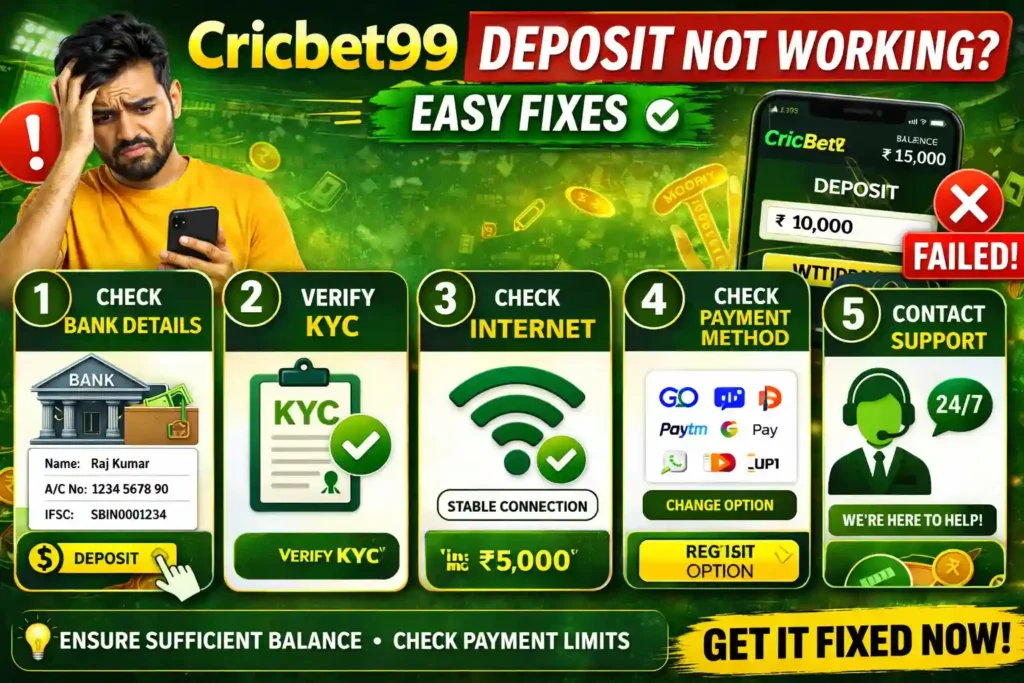
Best Quick Checklist to Fix Cricbet99 Deposit Problems
Before trying again, make sure:
- your payment details are correct
- your bank / wallet has enough balance
- you are using a supported method
- your account is verified
- your deposit amount is above minimum limit
- your internet connection is stable
- you have saved your payment proof
This simple checklist solves most deposit issues.
Final Conclusion
If your Cricbet99 deposit is not working, the issue is usually caused by:
- wrong payment details
- low balance
- unsupported method
- money debited but not credited yet
- unverified account
- technical errors
- low deposit amount
The best way to fix the problem is to double-check your payment information, use the right method, and keep your proof of payment safe. Most of the time, the problem can be fixed quickly, and once everything is entered correctly, the deposit process goes smoothly.
FAQs
Why is my Cricbet99 deposit not working?
It could happen because of wrong payment information, a low balance, a method that isn’t supported, problems with verifying your account, or technical problems.
What should I do if money is debited but not credited?
Wait a while, refresh your account, and keep your transaction screenshot and reference number safe.
Can wrong UPI details cause deposit failure?
Yes, wrong UPI reference numbers, amounts that don’t match, or wrong account information can all stop the deposit from going through.
What is the minimum deposit amount on Cricbet99?
It usually costs around ₹150, but the price may change depending on how you pay.
How can I fix Cricbet99 deposit issues fast?
Make sure you have the right payment information, the right method, enough money, and a copy of your payment proof before trying again.